
AI product video workflow: faster output, higher sales
QuickAdVideo Team
Author
Product video production used to mean booking studios, hiring editors, wrangling freelancers, and watching deadlines slip while your competitors kept publishing. For e-commerce brands running dozens or hundreds of SKUs, that model breaks down fast. AI-powered video workflows change the equation entirely, cutting production time from weeks to hours and slashing costs dramatically. This guide walks you through every stage of building a repeatable, scalable AI product video workflow so you can publish more, convert better, and reclaim the time your business actually needs.
Table of Contents
- What you need to start: Tools and prerequisites
- Step-by-step: The AI-powered product video workflow
- Avoiding common mistakes and maximizing efficiency
- Results you can expect: Impact on sales, conversion, and returns
- Our take: What AI video workflows get wrong, and how pros close the gap
- Level up your product video workflow with QuickAdVideo
- Frequently asked questions
Key Takeaways
| Point | Details |
|---|---|
| AI boosts efficiency | Batch generate up to 40 product videos per month and reduce agency costs by up to 78%. |
| Structured workflows win | Defined stages and storyboards reduce chaos, speed production, and maximize quality. |
| Videos drive conversions | Product videos can increase conversion rates by 80% and lower return rates by 25%. |
| Human QA is vital | AI drafts need strong briefing and human review for accuracy and trusted hero content. |
What you need to start: Tools and prerequisites
Now that we understand the challenge and opportunity, let’s define what you need to build a streamlined workflow from the ground up.
Before generating a single frame, you need the right combination of tools, assets, and preparation. Jumping in without this foundation is the single biggest reason AI video projects produce mediocre results, regardless of how powerful the underlying technology is.
Essential AI tools for product videos
The benefits of AI video creation become real only when you pair the right tools with the right use cases. Leading platforms each handle different stages of production:
- Kling AI — High-quality video generation with strong motion consistency, ideal for product close-ups and lifestyle shots
- Luma — Photorealistic renders and smooth camera movement, best for hero product visuals
- Runway Gen-4 — Advanced scene control and cinematic output, excellent for brand-level campaigns
- CapCut — Fast editing, templates, and text overlays, well-suited to social media formats
- FluxNote — Scripting and prompt management for batch workflows
- Tolstoy AI Studio — Interactive and personalized video creation for product detail pages (PDPs)
According to a complete guide to AI-powered product videos, you can chain these models together using node interfaces like Weavy or Vidu for tighter output control. Think of chaining as an assembly line: one tool generates the raw footage, another refines the motion, and a third adds overlays and audio.
Traditional vs. AI workflow requirements
| Requirement | Traditional production | AI-powered workflow |
|---|---|---|
| Equipment | Camera, lighting, studio | Product images, data feed |
| Team size | Director, editor, talent | 1-2 operators |
| Time per video | 2-5 days | 20-60 minutes |
| Cost per video | $500-$5,000+ | $1-$50 |
| Scalability | Low (manual bottleneck) | High (batch processing) |
If you are getting started with AI video ads for the first time, prioritize assembling your asset library before touching any AI tool.
Asset and briefing prerequisites
Your AI tools are only as good as what you feed them. You need clean, well-labeled assets in the right formats:
- Product images — Minimum 1080px, white or lifestyle backgrounds, multiple angles
- Data feeds — CSV or XML files with product title, key benefits, price, and target keyword per SKU
- SKU sheets — Organized spreadsheets mapping each product to its specific messaging and platform destination
- Brand kit — Logo files, color codes, font files, and tone-of-voice guidelines
For platform briefing, document the target audience, video length per channel (15 seconds for TikTok, 30-60 seconds for Instagram Reels, up to 2 minutes for YouTube Shorts), and the primary call-to-action (CTA) for each placement. This is also where exploring quickads.ai alternatives helps you identify platforms that match your specific briefing requirements.
Pro Tip: Tag every asset with product name, SKU, color variant, and intended platform before uploading. The GIGO (Garbage In, Garbage Out) principle applies hard here. Vague or mislabeled assets produce off-brand, generic videos that require hours of rework.
Step-by-step: The AI-powered product video workflow
With tools and assets prepared, here’s how to execute a streamlined workflow with AI-driven efficiency.

A repeatable workflow transforms chaotic one-off productions into a reliable content machine. Following a structured process also makes quality assurance (QA, checking videos for accuracy and consistency) far easier because everyone knows exactly what each stage should produce.
The four core stages
According to a standard video production workflow, every production moves through four stages: pre-production, production, post-production, and distribution. Here’s how each stage works inside an AI-powered system:
- Pre-production — Finalize your product brief, confirm asset library is complete, load data feeds into your AI platform, and define your storyboard structure for each SKU
- Production — Run AI generation using your prompts and asset inputs; create multiple variations per product (different angles, hooks, and CTAs)
- Post-production — Review outputs against your brief, add text overlays, music, voiceover, and brand elements using tools like CapCut or Runway
- Distribution — Embed final videos on PDPs, schedule for social media publishing, and log performance data for optimization
The 5-shot storyboard framework
AI-driven scalable storyboard workflows for e-commerce rely on a consistent 5-shot structure that works across virtually every product category:
- Product close-up — Crisp, detail-forward shot that establishes what the product looks like
- Lifestyle integration — Shows the product in real-world use by your target customer persona
- Feature zoom — Highlights the single most important selling point in detail
- Usage demo — Demonstrates how the product works or solves a specific problem
- CTA overlay — Closes with a clear call-to-action tied to the platform (Shop Now, Link in Bio, etc.)
This structure enables batch generation because the prompt architecture stays consistent across SKUs. You swap out the product-specific data, run the generation, and your output follows a proven conversion-optimized sequence every time.
| Workflow stage | Key tools | Expected output |
|---|---|---|
| Pre-production | FluxNote, spreadsheet | Briefs, storyboards, asset libraries |
| Production | Kling AI, Luma, Runway Gen-4 | Raw video clips per SKU |
| Post-production | CapCut, Premiere, Tolstoy | Edited, branded video files |
| Distribution | Native platforms, scheduling tools | Published videos on PDP and social |
Understanding how to automate video content with AI turns this four-stage process into a nearly hands-free operation for repeat product launches.
Pro Tip: Chain AI models at the production stage rather than relying on a single tool. Use Kling or Luma for initial generation, then pass outputs through Runway Gen-4 for stylistic consistency. Build in a mandatory QA checkpoint between production and post-production. Catching errors early saves significantly more time than fixing them after distribution.
Also worth noting: the debate around UGC vs traditional video formats becomes easier to resolve when you can batch-produce both styles using AI within the same workflow.
Avoiding common mistakes and maximizing efficiency
While following the workflow can greatly simplify production, it’s easy to stumble over avoidable pitfalls. Here’s how to stay efficient and maintain quality.
Even well-funded teams make preventable mistakes when adopting AI video workflows for the first time. Most of these mistakes happen before production even starts.
The most common workflow mistakes
- Vague briefs — Describing a product as “a water bottle for active people” produces generic output. Specify “a 32oz stainless steel insulated bottle targeting trail runners aged 25-40, emphasizing 24-hour temperature retention.”
- Poor asset tagging — Uploading images without SKU labels or color variant data forces manual sorting later and breaks batch generation
- Skipping the kickoff call — Assuming your brief is self-explanatory leads to misaligned output, especially when working with agencies or cross-functional teams
- Rushed QA — Reviewing 40 videos in 10 minutes because you are excited to publish guarantees that errors go live
- Ignoring platform specs — Using the same video dimensions and caption length for TikTok and YouTube creates suboptimal experiences on both
“Briefing is the most underestimated step in video production. A thorough agency brief that specifies product use case, audience, platform, key message, and brand requirements eliminates the majority of revision cycles before a single frame is generated. A kickoff call is non-negotiable.”
Your briefing checklist
Before starting any AI production session, confirm you have documented:
- Product name, SKU, and category
- Target audience persona (age, interests, pain points)
- Platform destination and format requirements
- Primary key message (one sentence, not a list)
- Secondary messages or feature highlights
- Brand guidelines (logo placement, color rules, prohibited language)
- Legal disclaimers or claims restrictions
AI’s shift toward template-driven production, using category scripts and structured data feeds, means your briefing documents become reusable templates across entire product lines. This is where the efficiency multiplies. For a fashion brand with 200 SKUs, one well-built category script generates briefs for every product automatically. The GIGO principle remains critical throughout: precise asset tagging and complete data feeds are what separate 20-minute batch runs from 3-hour troubleshooting sessions.
Pro Tip: Build a “master brief template” for each product category you sell. Include all static brand elements and leave variable fields for product-specific data. Pair this with creative video ideas for ecommerce to ensure each template covers multiple content angles without starting from scratch each time.
Results you can expect: Impact on sales, conversion, and returns
Armed with a properly executed workflow, here’s how these improvements translate to real-world performance and business outcomes.
The business case for AI-powered product video workflows is not theoretical. The data is clear, and the impact on core e-commerce metrics is significant enough that delaying adoption has a real cost.
Conversion and purchase intent
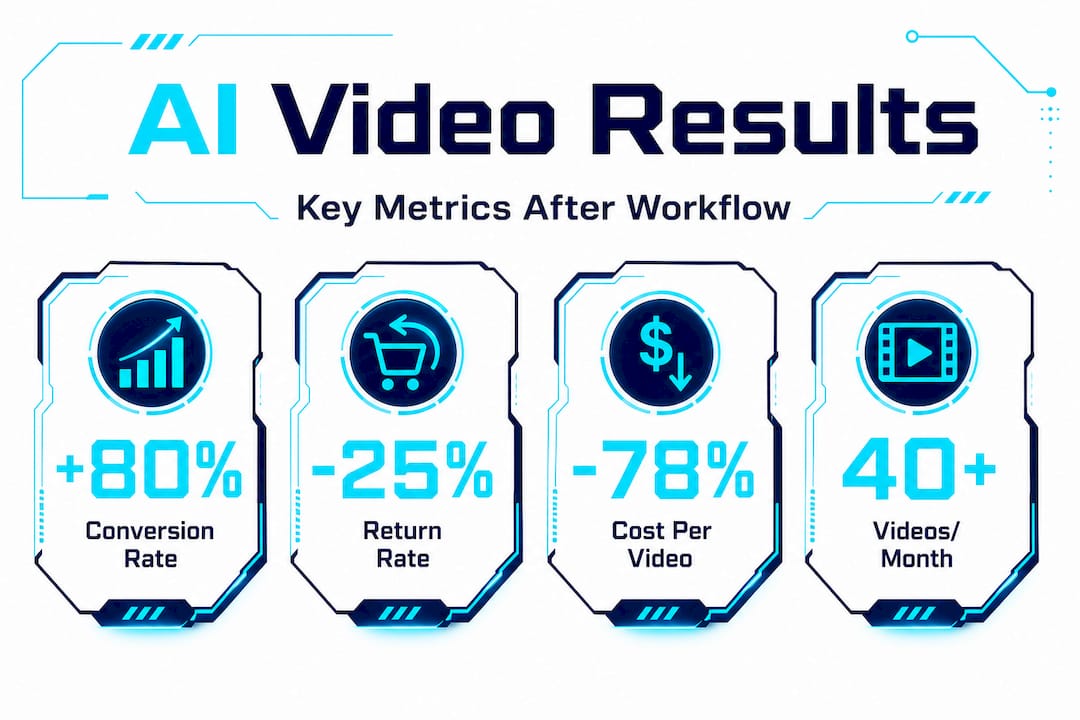
Product videos boost conversions by 80% for e-commerce businesses, and viewers are 1.81 times more likely to purchase after watching a product video compared to static images alone. That is not a marginal improvement; it is a fundamental shift in how shoppers evaluate and buy online.
Return rates drop by 25% when customers watch product videos before buying. This makes logical sense: a well-made video sets accurate expectations for how a product looks, feels, and functions. Fewer surprises mean fewer returns, which directly improves your profit margin on every order.
Cost and scale
The cost savings at scale are equally compelling. With platforms like fal.ai combined with Kling AI, production costs drop to roughly $1 per scene, and a three-person agency can achieve a 78% cost reduction compared to traditional video production. That means a production budget that previously covered 10 videos now covers 45 or more.
| Metric | Before AI workflow | After AI workflow |
|---|---|---|
| Conversion rate lift | Baseline | +80% |
| Purchase intent | Baseline | 1.81x higher |
| Return rate | Baseline | -25% |
| Cost per video | $500-$5,000 | $1-$50 |
| Videos per month | 5-10 | 40-100+ |
| Agency cost reduction | Baseline | 78% |
Understanding the full picture of video sales psychology and ROI makes these numbers feel less like statistics and more like strategic levers you can control. Knowing why video converts helps you build more effective storyboards from the start.
Secondary benefits worth tracking
Beyond the headline numbers, AI video workflows deliver compounding advantages:
- Brand visibility — Higher publishing frequency increases organic reach across TikTok, Instagram, and YouTube without increasing ad spend
- PDP engagement — Product pages with video keep visitors on-site longer, which signals relevance to search engines and improves organic rankings
- Faster feedback loops — Rapid production means you can test 5 video concepts in the time it previously took to produce one, accelerating what you learn about your audience
- Agency capacity — Teams that previously maxed out at 15 client videos per month can scale to 80-100 without adding headcount
For a deeper breakdown of how to measure and optimize these gains, video marketing ROI strategies offers a practical framework for tracking performance across all channels.
Our take: What AI video workflows get wrong, and how pros close the gap
Speed is seductive. When you realize you can generate 30 product videos in an afternoon, the temptation is to publish everything immediately and let the algorithm sort it out. This is where a lot of brands quietly undermine themselves.
AI tools scale and streamline brilliantly, but they cannot guarantee narrative coherence, factual accuracy, or the kind of emotional resonance that turns a casual viewer into a loyal customer. Testing six AI video tools for product marketing confirms that hybrid workflows, using AI for drafts and professional tools like Premiere for polish and continuity, consistently outperform pure-AI outputs in terms of brand trust and conversion.
“AI augments the production process; it does not replace the editorial judgment required to create content people actually trust. According to the complete guide to AI-powered product videos, vague briefs and skipped QA cycles are where purely AI-driven workflows fail to deliver hero content standards.”
The brands winning with AI video right now are not the ones generating the most content. They are the ones generating the most reviewed content. They treat every AI output as a first draft, not a finished product. They run QA against their brief, fix inconsistencies, and apply a human editorial lens before anything goes live.
The practical recommendation is to build a hybrid model. Use AI for the heavy lifting: scene generation, scripting variations, asset rendering. Then allocate 20-30% of your saved production time to review, refinement, and creative judgment. This combination is where automation in AI video workflows becomes genuinely powerful rather than just fast.
Pro Tip: Treat your first AI-generated batch as a calibration run, not a launch. Review the outputs, identify the recurring issues (wrong tone, inconsistent colors, CTA placement), update your prompts and templates, then run the batch again. Two iterations done this way will outperform twenty iterations done without review.
Level up your product video workflow with QuickAdVideo
Ready to streamline your own product video workflow and accelerate sales? Here’s how QuickAdVideo can help you put these strategies into action.
QuickAdVideo is built specifically for e-commerce sellers, dropshippers, and marketing agencies who need to produce high-converting sales videos at scale, without studios, editors, or creative agencies. Simply enter your product URL, and the platform generates persuasive, direct-response video content in minutes. Choose from multiple workflow models including UGC, cinematic, and viral story formats tailored to different marketing goals. Need to fine-tune a specific video? The built-in video editor gives you full control over overlays, music, and branding without leaving the platform. Pay per credit or subscribe based on your volume, and publish directly to TikTok, Instagram, YouTube, and Facebook.
Frequently asked questions
Which AI tools are best for product video workflows in ecommerce?
Kling AI, Luma, Runway Gen-4, Tolstoy AI Studio, and CapCut are the leading platforms for efficient, scalable video creation, each serving a distinct production stage from scene generation to editing and interactivity.
How much time and money can AI workflows save for an ecommerce agency?
AI-powered workflows can reduce costs by 78% compared to traditional production, and a structured 5-shot workflow enables teams to produce 5 to 10 videos per 2-hour session, scaling to 40 or more videos monthly without adding headcount.
How do product videos impact conversion rates in ecommerce?
Product videos boost conversions by 80% and make viewers 1.81 times more likely to purchase, while also reducing return rates by 25% because shoppers arrive at checkout with accurate product expectations.
What should I include in a video brief for agencies or internal teams?
Specify the product, use case, target audience, platform, key messages, and brand or legal requirements, and always hold a kickoff call to align all parties before production begins.
Recommended
Related Posts

Why Use Templates for Video Ads: Scale Smarter
Discover why use templates for video ads to streamline production. Boost efficiency and scale your campaigns without losing creativity!

The Role of Data-Driven Video Ads in Boosting ROI
Discover the role of data-driven video ads in boosting ROI. Learn how analytics enhance engagement, optimize campaigns, and drive results.

Create Persuasive Video Ads Workflow That Converts
Learn how to create persuasive video ads workflow that transforms your ideas into optimized, high-converting campaigns. Get started today!